10 Must-Have Claude MCP Servers I Actually Use in 2026
When MCP first showed up I ignored it for a couple of weeks. After years of working as a senior developer, I have built up a healthy resistance to AI hype, and I assumed this was more of it, another announcement that would quietly disappear by the next release. I was wrong, and I do not admit that about new tooling very often.
The honest version is this: once I connected Claude to my actual tools, it stopped being a clever autocomplete and started being something closer to a junior engineer who already knows my codebase. That is the whole pitch. I still review everything it produces the same way I would review a teammate's pull request, but the amount it gets right on the first try has changed how I spend my day. So here are the Claude MCP servers I actually keep installed, with my real opinion on each one rather than a copy-paste of the marketing page.
A quick reminder of what MCP actually is
MCP stands for Model Context Protocol. It is an open standard that lets an AI assistant like Claude talk to outside tools and data through small programs called servers. One server might give Claude access to your GitHub repos, another to a real browser, another to your error tracking. The client (Claude Desktop or Claude Code) handles the conversation, and each MCP server hands Claude a set of tools it can call.
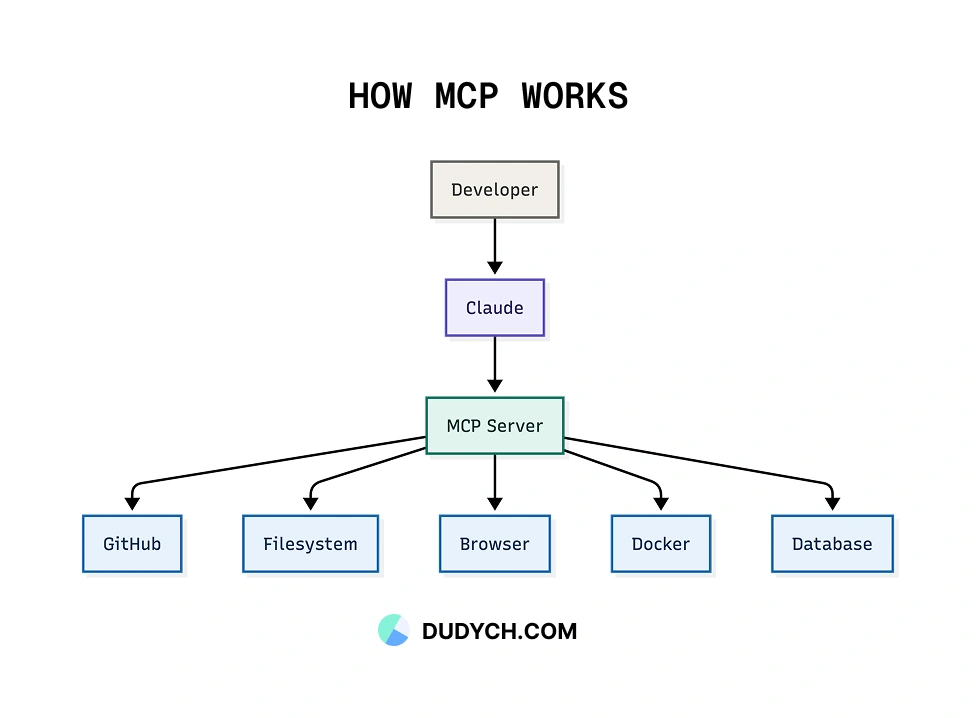
The reason it matters is simple. A model on its own only knows what it was trained on and what you paste into the chat. An MCP server lets it go and fetch the real thing. That difference is bigger than it sounds, and the servers below are where I felt it most. Almost all of the MCP servers for Claude Code below also work in Claude Desktop, so do not worry too much about which client you are on.
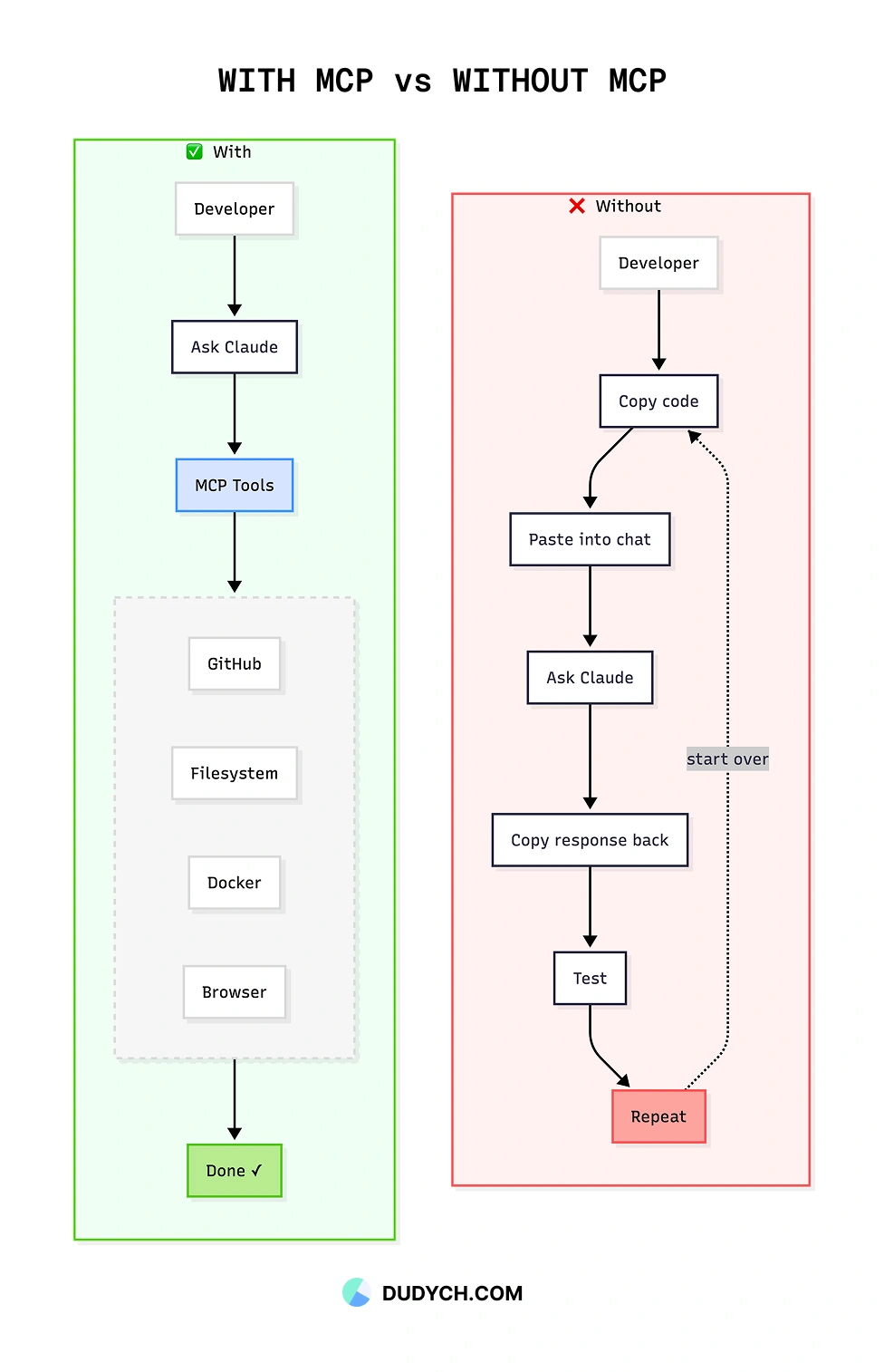
A small warning before the list. You do not need all ten. I will come back to this at the end, because installing every server you can find is a mistake I already made for you.
1. GitHub
This is the one I would install first on any machine. The GitHub MCP server lets Claude search code across a repo, read and triage issues, look through pull requests, and pull commit history into context without me copy-pasting any of it.
What changed for me day to day is PR review. A good chunk of my week is reviewing my team's pull requests, and that is where this earns its keep. I point Claude at an open pull request, it reads the diff and the linked issue together, and I get a sane summary before I have even opened the files myself. It does not replace my review, but it removes the slow part where I rebuild context in my head every Monday morning.
The server itself is free. You will likely need a GitHub personal access token so it can reach private repos, and I would scope that token tightly rather than handing it the keys to everything.
2. Context7
If I could only keep one server on this list, it might be this one. The Context7 MCP server pulls up-to-date, version-specific documentation for libraries straight into Claude's context.
Here is the problem it solves. I work in React and Next.js, and those move fast. A model with a training cutoff will confidently give you an API that got renamed two minor versions ago, and you waste ten minutes before you realise the suggestion was stale. Context7 fixes that by feeding Claude the current docs for the exact version you are on. The number of wrong-but-confident answers I get has dropped a lot since I started using it.
It is free and needs no API key, which makes the decision to install it very easy.
3. Chrome DevTools
This one genuinely surprised me. The Chrome DevTools MCP server lets Claude drive and inspect a real Chrome instance. It can read the console, look at network requests, pull a performance trace, and inspect the DOM.
For frontend debugging this is the difference between me describing a bug and Claude actually seeing it. Instead of pasting a console error and hoping I copied the right lines, I let it read the console directly. When a page is slow, it can look at the trace rather than guess. If you spend your days in the browser like I do, this earns its place fast.
It is free and open source. Pair it with a clean editor setup and the feedback loop gets genuinely quick. I wrote about how I strip my VS Code down to reduce noise if you want that side of the workflow too.
4. Playwright
I write Playwright tests at work, so this server slotted straight into how I already operate. The Playwright MCP server gives Claude browser automation through the accessibility tree, which is great for scaffolding end-to-end tests and reproducing bugs on a live page.
My favourite use is turning a bug report into a failing test. I describe the steps, Claude drives the browser, and I get a reproducible Playwright spec out the other side. That is the part of testing I always procrastinate on, so handing it off has been a quiet win.
Free and open source, maintained by the Playwright team, so it stays close to the real tool rather than drifting.
5. Sentry
Once something is in production, the questions change, and Sentry is where I answer them. The Sentry MCP server pulls error data, issue details, and stack traces into Claude so it can help with real production debugging instead of hypotheticals.
The workflow I like is boring but effective. I give Claude a Sentry issue, it reads the stack trace and the surrounding context, and it comes back with a short list of likely causes. Most of the time one of them is right, and even when it is not, it has saved me the first twenty minutes of staring at a trace.
The server is free. You will need a Sentry account and a token for it to read your project, which most teams using Sentry already have.
6. Sequential Thinking
This is the odd one on the list because it does not connect to any outside service. Sequential Thinking gives Claude a structured space to reason in steps, revise earlier thoughts, and branch when a problem is messy.
I do not reach for it every day. But when I am untangling a gnarly bug or planning a migration with a lot of moving parts, having the model think out loud in a more disciplined way produces noticeably better plans. Think of it as the server you are glad you installed on the hard days rather than the easy ones.
Free and open source, and it costs you nothing to leave it sitting there until you need it.
7. DuckDuckGo
Sometimes you just need a quick web search and you do not want to wire up a paid search API to get it. The DuckDuckGo MCP server does web search with no API key at all.
It is not going to replace a dedicated research setup, and I am honest with myself about that. For everyday lookups though, checking whether a library is still maintained, finding a changelog, confirming a syntax detail, it is more than good enough and the zero-setup part is the real selling point.
Free and open source, which fits the theme of this whole list.
8. Notion
A lot of my thinking lives in Notion. Specs, loose notes, half-finished ideas for posts like this one. The Notion MCP server lets Claude read and update pages and databases, which means I can pull a spec into context instead of copying it across by hand.
The thing I did not expect was how useful the write side is. I can ask Claude to drop a summary back into the right Notion page after a session, and my notes stay current without me babysitting them. If your team runs on a wiki, this connects the AI to where the knowledge already is.
The server is free. You will need a Notion account and an integration token so it can see the right workspace.
9. Stripe
This one is more specialised, so install it only if you actually touch payments. The Stripe MCP server lets Claude work with billing and subscription data, customers, and the rest of the Stripe object model.
When I am building subscription logic, being able to ask Claude to inspect test-mode data and reason about edge cases has been handy. The honest caveat matters more here than anywhere else on the list: be very careful with keys, keep it on test mode while you are experimenting, and do not casually point it at live billing data. Money bugs are the kind you remember.
The server is free, but you need a Stripe account and an API key, and I would treat that key with respect.
10. Postgres
I saved a practical one for last. The Postgres MCP server lets Claude read your database schema and run read queries, so it understands your data model without me describing every table from memory.
This kills one of the most tedious parts of working with an AI on a real app, which is explaining your schema over and over. Instead it just looks. I keep mine strictly read-only, and I would strongly suggest you do the same. Letting a model run write queries against a real database is a horror story waiting to happen.
Free and open source. Point it at a read-only connection and relax.
The honest downside nobody mentions
Here is the part the excited blog posts skip. Every MCP server you add hands Claude more tools, and every tool takes up room in the context window. Install all ten on every project and you will actually make the model worse, because it has to wade through a huge menu of options before it does anything useful.
So I do not run all of these at once. I keep a small core that is on everywhere, GitHub, Context7, and Chrome DevTools, and I switch the rest on per project. Stripe only exists on the apps that bill people. Postgres only on the ones with a database I care about. Sentry only where I have real production traffic.
Treat MCP servers like dependencies, not like browser extensions you collect and forget. The same instinct that makes me picky about my package manager applies here. Less, chosen on purpose, beats more.
The short version
If you want the quick reference, here is the whole list in one place.
| Server | What it does | Cost and setup |
|---|---|---|
| GitHub | Issues, PRs, code search, repo work | Free server, GitHub token usually needed |
| Context7 | Up-to-date library docs in context | Free, no API key |
| Chrome DevTools | Real Chrome debugging and inspection | Free and open source |
| Playwright | Browser automation and end-to-end tests | Free and open source |
| Sentry | Error tracing and production debugging | Free server, Sentry account needed |
| Sequential Thinking | Better multi-step reasoning and planning | Free and open source |
| DuckDuckGo | Web search without an API key | Free and open source |
| Notion | Docs and wiki workflows | Free server, Notion account needed |
| Stripe | Billing and subscription workflows | Free server, Stripe account needed |
| Postgres | Read your schema and run safe queries | Free and open source |
Final thoughts
MCP is the thing that moved Claude from a helpful chat window to an actual part of my workflow. These are the best MCP servers I have found so far, the must-have MCP servers that survived a year of me trying everything and quietly uninstalling most of it.
If you are putting together your MCP servers in 2026, my advice is to start small. Install GitHub and Context7, live with them for a week, and add the rest only when you hit a wall they would solve. The best setup is not the one with the most servers. It is the one where every server you have is pulling its weight, and you could tell me exactly why each one is still there.
If you end up with a setup you love, I would genuinely like to hear what made your list and what did not.
Frequently asked questions
What is MCP (Model Context Protocol)?
MCP, the Model Context Protocol, is an open standard that lets an AI assistant like Claude connect to outside tools and data through small programs called servers. Each server hands Claude a set of tools it can call, such as access to your GitHub repos, a real browser, or your error tracking.
Which Claude MCP servers should I install first?
Start small with GitHub and Context7, live with them for a week, and add more only when you hit a problem they would solve. The author keeps a core of GitHub, Context7, and Chrome DevTools on everywhere and switches the rest on per project.
Do MCP servers cost money?
All ten servers in this list are free, and many are open source. Some do need an account and an API token for the underlying service, such as GitHub, Sentry, Notion, or Stripe.
Should I install as many MCP servers as possible?
No. Every server adds more tools to Claude's context window, and running all of them at once can actually make the model worse because it has to wade through a huge menu of options. Treat MCP servers like dependencies rather than browser extensions and keep only the ones pulling their weight.
Do these MCP servers work in Claude Desktop or only Claude Code?
Almost all of the servers work in both Claude Desktop and Claude Code, so it does not matter much which client you are on.